W2 — Canvas: Live + Draft
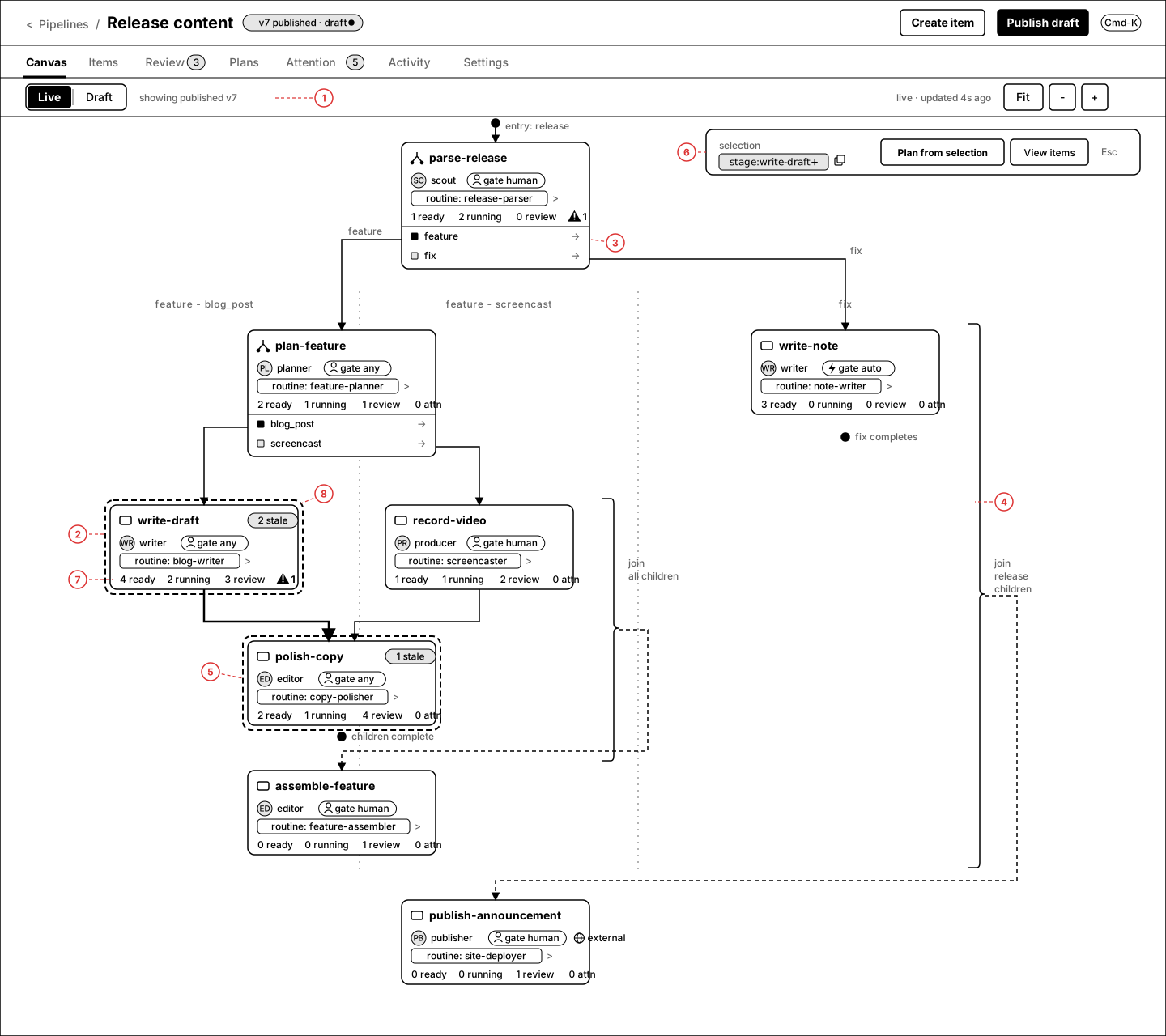
One canvas page, two modes. Live is the published recipe as a monitoring surface — counts, staleness, attention on every stage. Draft is the same geometry with editing, lint, stage config drawers, and publish-with-diff. All boards use the Appendix-A release pipeline: two fan-outs (release → feature/fix, feature → blog_post/screencast), nested join brackets, one shared stage (polish-copy), and an external side-effect terminal stage.
1.Live canvas — monitoring overlay
The default landing view of a pipeline. Shows the published graph (v7) with live counts per stage. Selecting a branch surfaces the floating selection bar with its selector-grammar equivalent.
Annotations
- 1 — Live/Draft mode switch; caption names what you're looking at ("showing published v7") plus freshness of the overlay data.
- 2 — StageNodeCard identity row: kind icon, agent chip, gate chip.
- 3 — RouterBlock on a fan-out: typed child rows are the edge anchors; lane labels repeat the type.
- 4 — Outer JoinBracket: all release children complete → dashed resume edge into publish-announcement.
- 5 — Shared stage: polish-copy receives both blog_post and screencast lanes; selection includes it via downstream closure.
- 6 — Selection bar: chip is real selector grammar (
stage:write-draft+), copyable, with "Plan from selection" / "View items". - 7 — Live counts row: ready · running · review · attention. Attention only renders when > 0.
- 8 — Selection ring (dashed) on write-draft + emphasized downstream edge.
2.Stage peek drawer
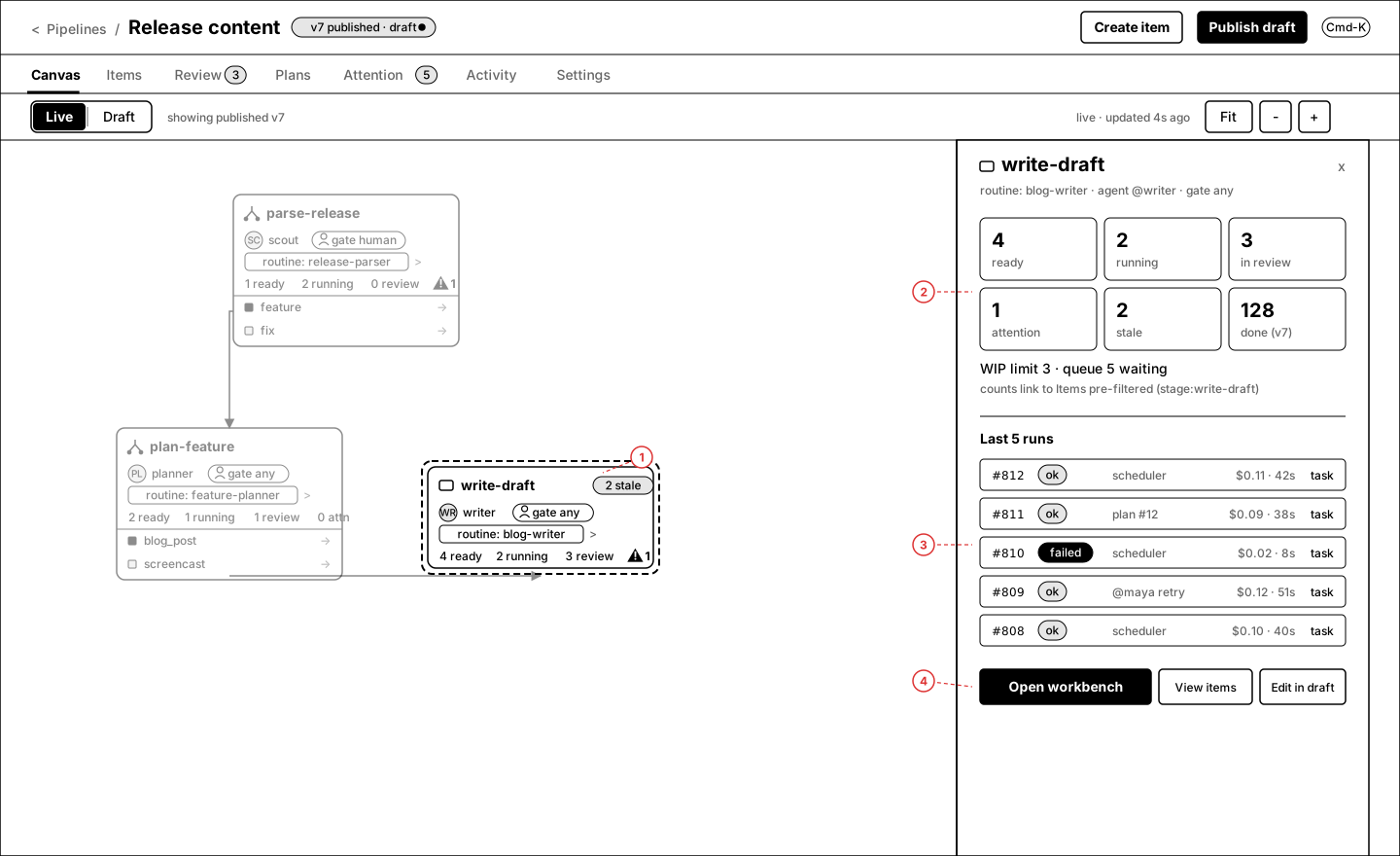
Click a node in Live mode → right drawer with the stage's operational summary. Read-only; edits route to Draft or the workbench.
Annotations
- 1 — Clicked node stays selected (dashed ring); rest of canvas dims.
- 2 — Count tiles (ready/running/review/attention/stale/done). Each tile deep-links to Items pre-filtered (
stage:write-draft+ status). - 3 — Last 5 runs as RunRows: attempt, status, initiator, cost, duration, task link. Failed rows carry the retry context.
- 4 — Footer: Open workbench (primary), View items, Edit in draft.
3.Live states — never-published + all-quiet
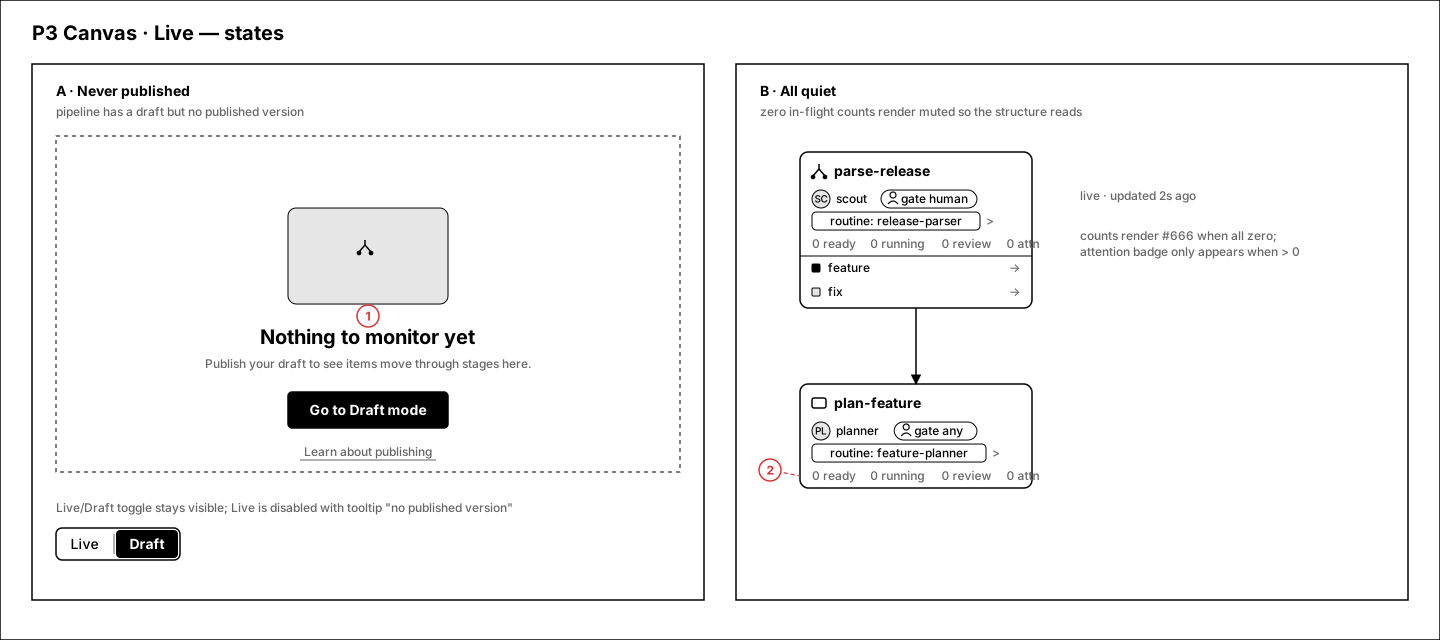
Two required states: a pipeline that has never been published (Live has nothing to show) and a healthy pipeline with zero activity.
Annotations
- 1 — Never published: Live mode is an EmptyState with a single CTA into Draft; the mode switch stays visible so the model ("Live = published") is learnable.
- 2 — All quiet: zero counts render muted (#666), attention badge hidden entirely — a healthy pipeline should look calm, not empty.
4.Live @ 390px
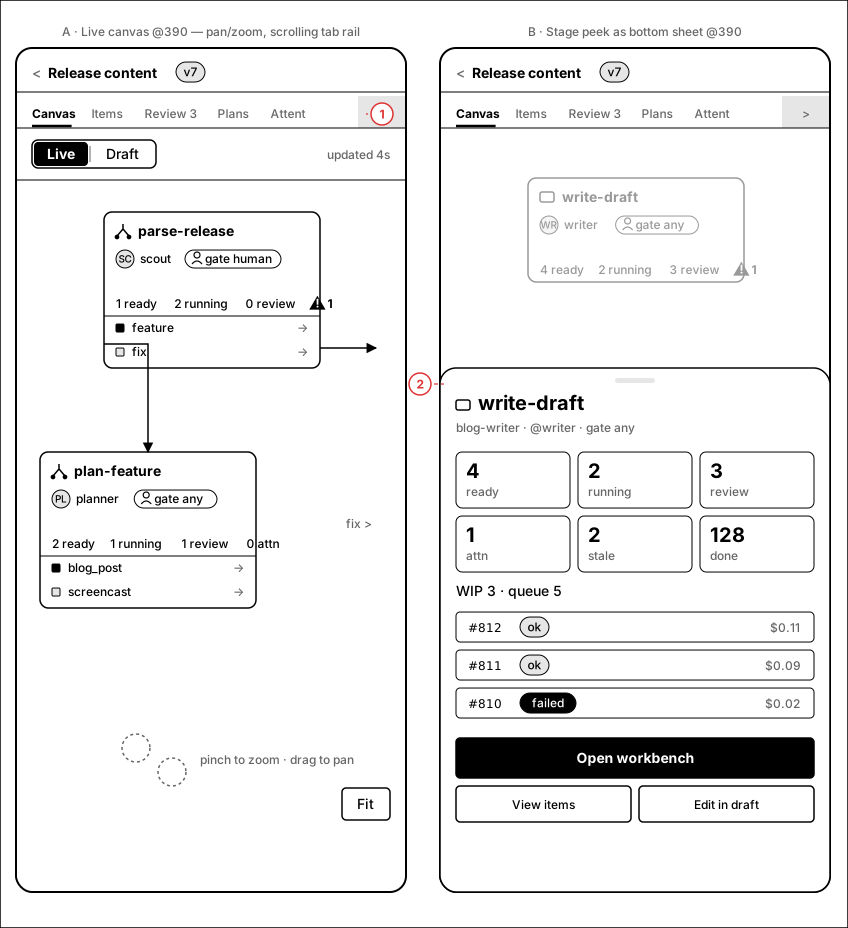
Narrow behavior: pan/zoom canvas with compact cards; the stage peek becomes a bottom sheet.
Annotations
- 1 — Canvas pans/zooms; tab rail scrolls horizontally; tap a card to peek.
- 2 — Peek drawer becomes a bottom sheet with the same tiles/runs/footer, scrollable, dismissed by swipe or ×.
5.Draft mode — palette, lint ring, LintDock
Same geometry as Live, plus: hatched draft banner, floating stage palette, lint ring on offending nodes, and the expanded LintDock pinned to the bottom. Publish is blocked while errors exist.
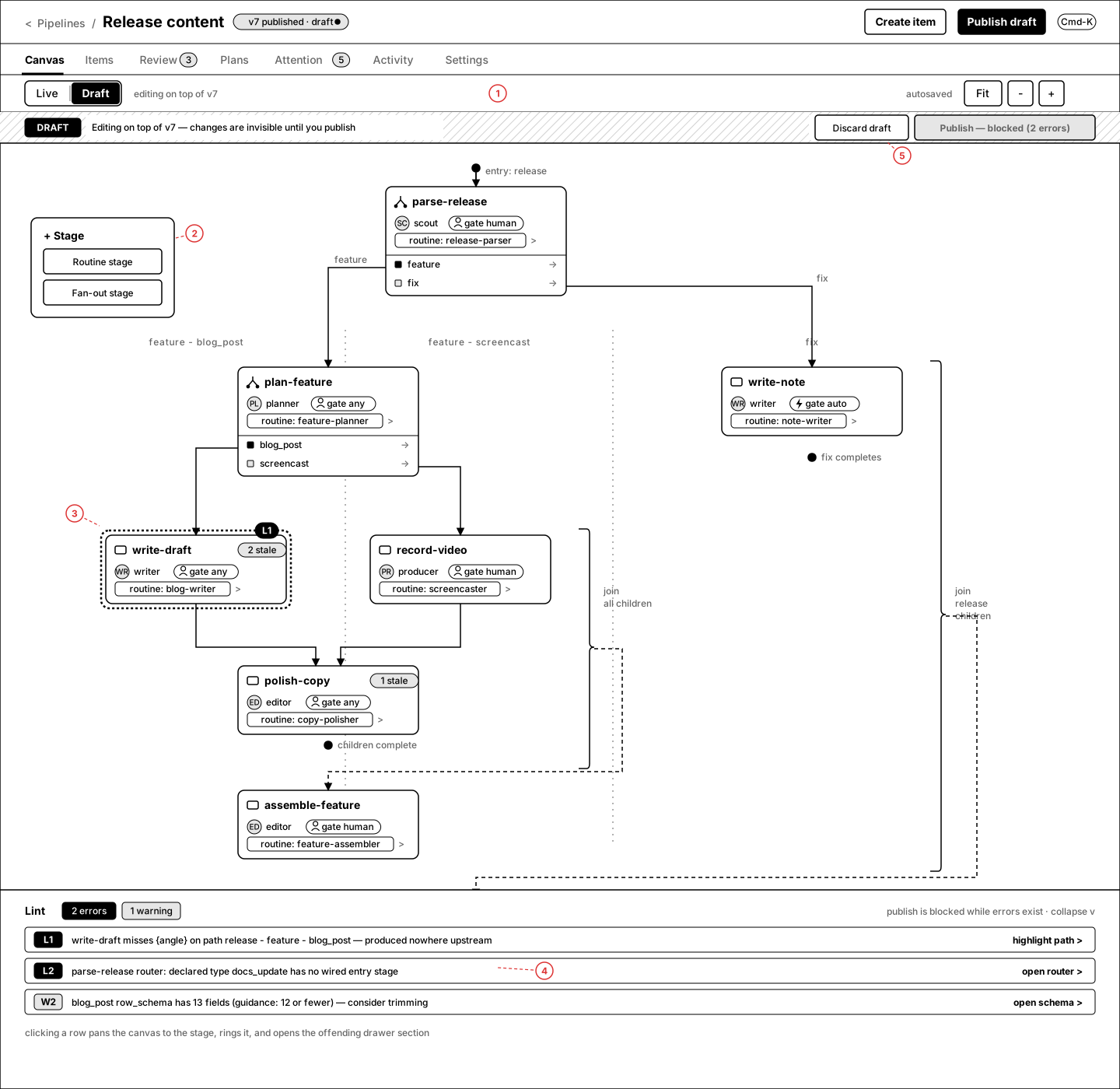
Annotations
- 1 — Mode switch flipped to Draft; caption "editing on top of v7"; autosave indicator right.
- 2 — Floating + Stage palette (routine / fan-out) — drag or click-to-place.
- 3 — Lint ring on write-draft with the error chip (L1) pinned to the card corner.
- 4 — LintDock rows deep-link: L1 → drawer variables section, L2 → router, W2 → schema. Errors block publish; warnings don't.
- 5 — "Publish — blocked (2 errors)" disabled in the banner; Discard draft beside it.
6.Stage config drawer — routine stage
Click a routine stage in Draft → full config drawer: identity, routine binding + variables, execution, review gate, side effects. Prompt editing stays in the workbench.
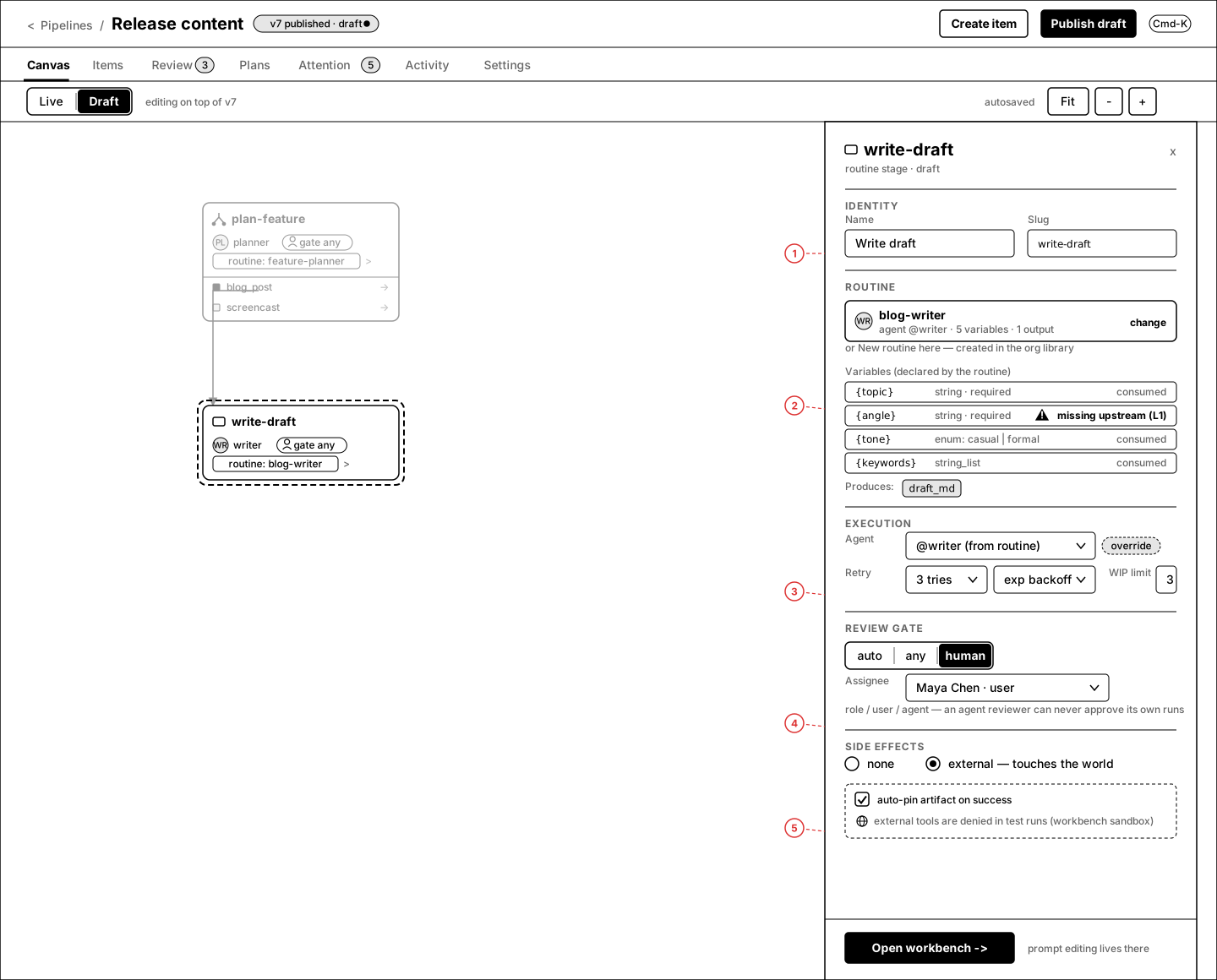
Annotations
- 1 — Identity: display name + slug (slug feeds selectors/URLs).
- 2 — Variables are declared by the routine, not the stage; each row shows type + where it's consumed.
{angle}missing upstream is lint L1 rendered in place. - 3 — Execution: agent (from routine, overridable), retry policy, WIP limit.
- 4 — Review gate: auto / any / human segmented + assignee. Caption states the invariant: an agent reviewer can never approve its own runs.
- 5 — Side effects: none / external. External implies auto-pin on success and denial of external tools in test runs.
7.Stage config drawer — fan-out + row schema
Fan-out stages declare child types, per-type row schemas (FieldDecl builder), and what happens after all children complete.
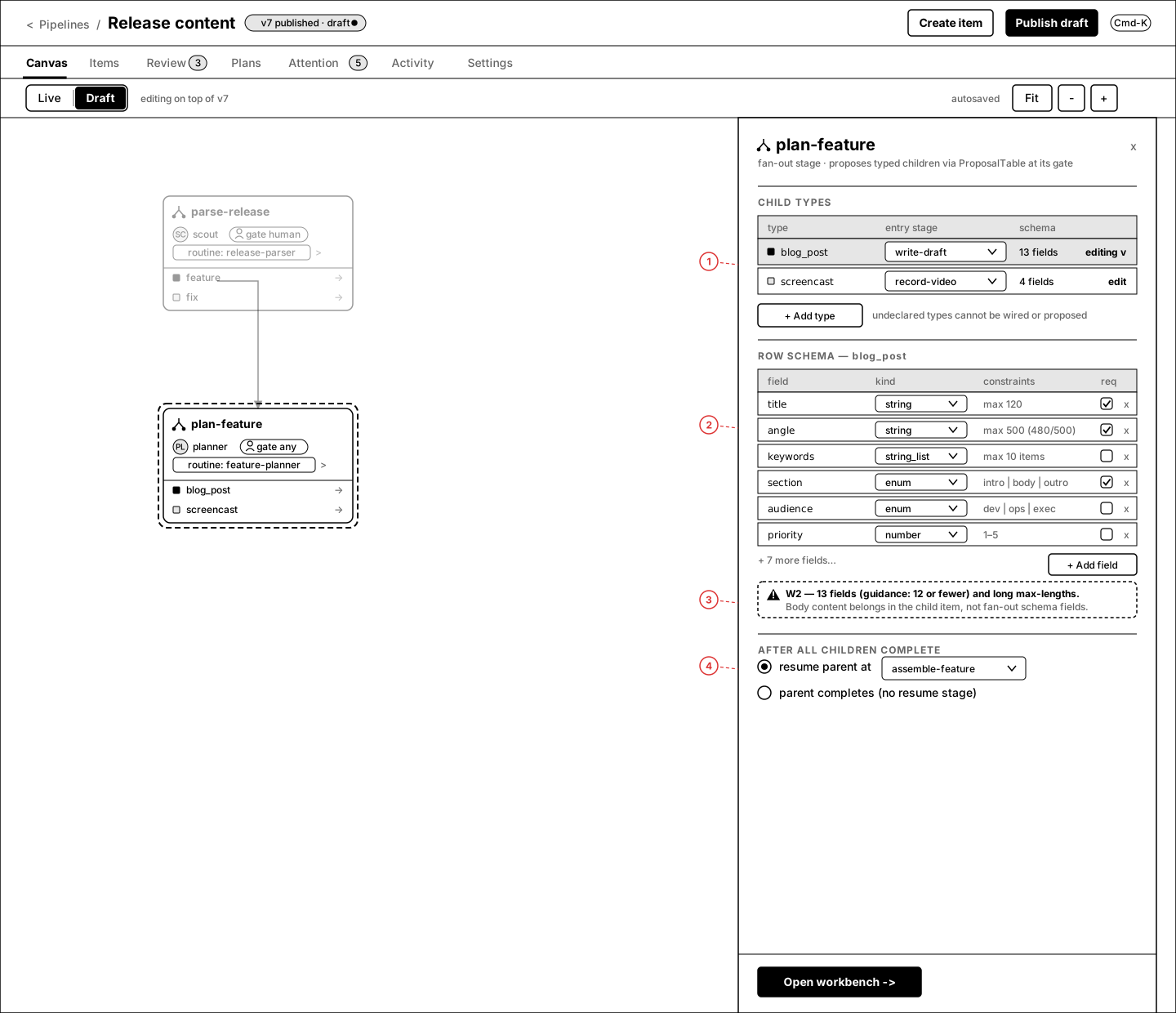
Annotations
- 1 — Child types table: type, entry stage (select), schema summary. Undeclared types can't be wired or proposed.
- 2 — Row-schema builder: field, kind (string / string_list / enum / number), constraints, required. Live char-count on long constraints (480/500).
- 3 — W2 guidance warning rendered inline where the problem is, not just in the dock.
- 4 — After-all-children-complete: resume parent at a stage, or parent completes.
8.PublishDiffDialog
Publishing v8 shows exactly what changed, grouped by kind, with a required message and an impact estimate before commit.
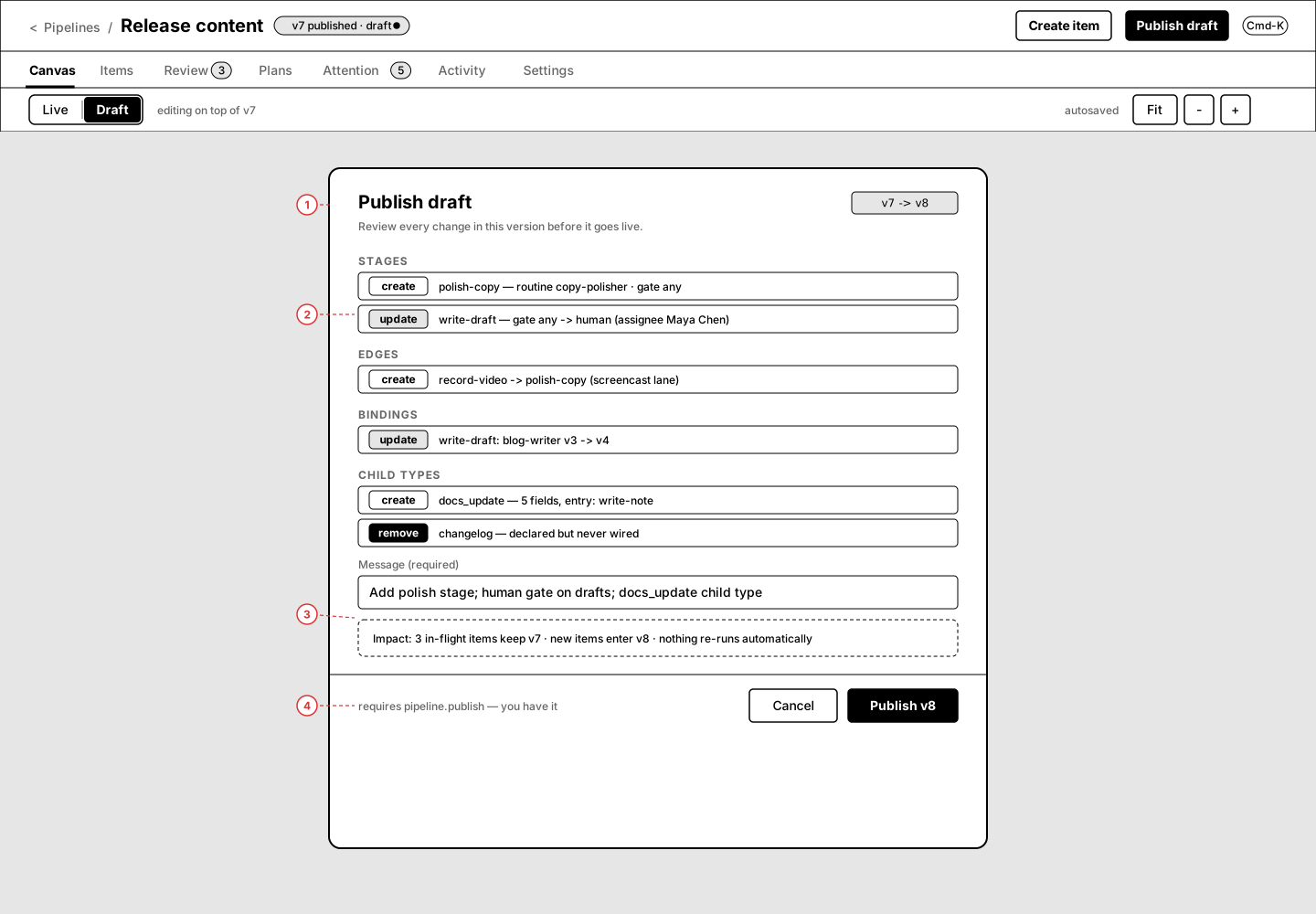
Annotations
- 1 — Changes grouped: STAGES / EDGES / BINDINGS / CHILD TYPES, each row with an OpBadge (create/update/remove).
- 2 — Update rows carry a one-line before→after summary.
- 3 — Required publish message + impact estimate ("~34 artifacts become stale") inside a dashed emphasis box.
- 4 — Footer: Cancel / Publish v8; permission note "requires pipeline.publish — you have it" (PermissionGate copy when you don't).
9.Draft banner states
The four states of the draft banner strip: clean (no draft), dirty (unpublished edits), lint-blocked, and publishing in-flight.
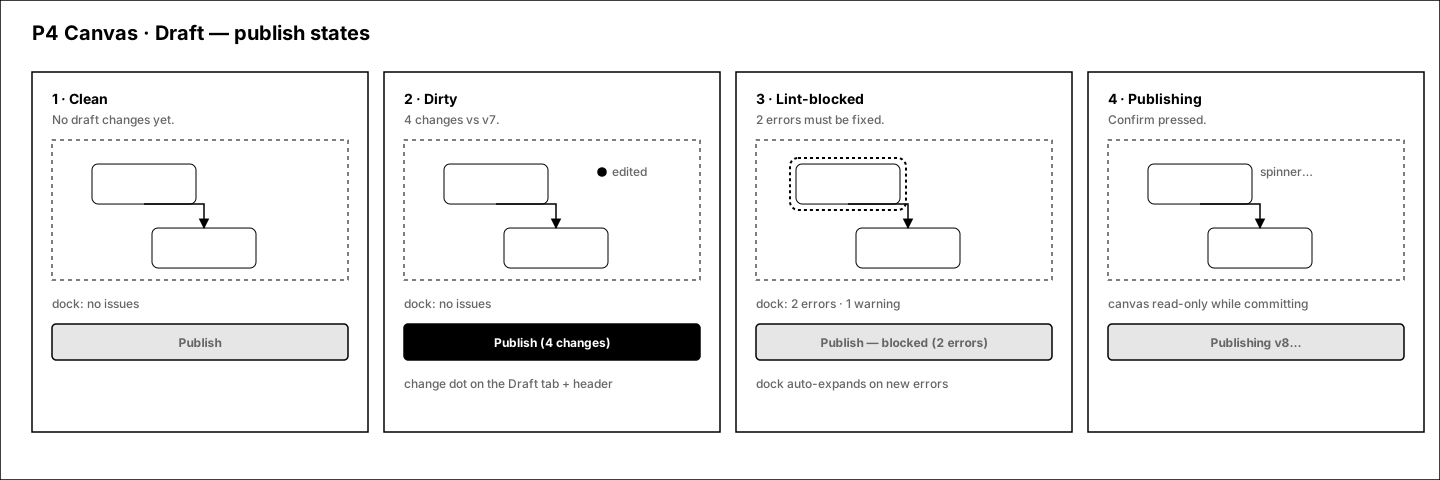
Annotations
- Clean → "Draft matches v7", publish disabled. Dirty → change count + Publish enabled. Lint-blocked → error count, publish disabled. Publishing → progress + canvas locked.
10.Draft @ 390px
Narrow behavior for editing: FAB for adding stages, collapsed lint strip, sticky publish bar; stage config becomes a full-screen sheet.
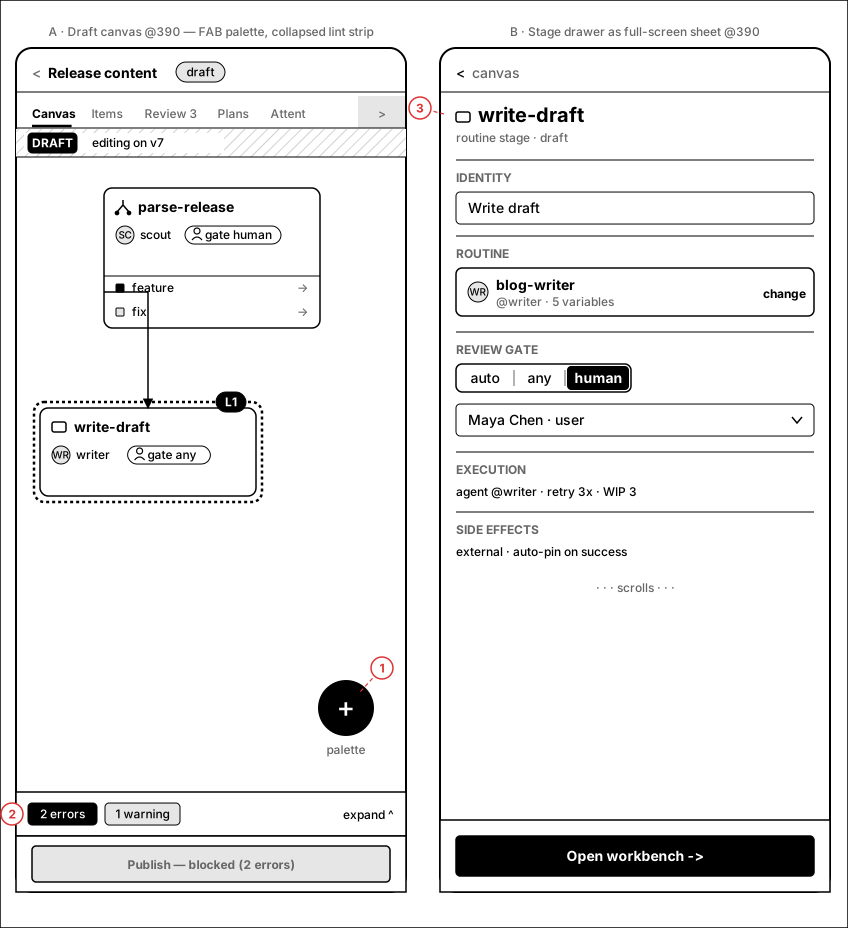
Annotations
- 1 — "+" FAB replaces the floating palette.
- 2 — Lint collapses to a one-line strip above the sticky publish bar; tapping expands.
- 3 — Stage config drawer becomes a full-screen sheet with the same sections and a pinned footer action.
Open questions
- Q1 — Live count tiles deep-link straight into the Items tab pre-filtered. OK, or should ready/running stay on-canvas (popover) and only done/attention navigate?
- Q2 — Selection bar verb is "Plan from selection" (creates a plan draft scoped by the selector). Happy with that wording vs "Regenerate…"?
- Q3 — Draft banner puts "Discard draft" one click from "Publish". Keep them adjacent (with confirm on discard), or separate discard into an overflow menu?
- Q4 — Mobile Draft is intentionally view-mostly: add/move stages works but schema editing pushes you to desktop breakpoints. Acceptable for v2?