Skill Studio — three-pane skill IDE
Lo-fi wireframes for the smallest shippable Skill Studio: a workspace opened from the Skills manager with the skill's files on the left, saved test inputs in the middle, and dry-run test runs against a real agent on the right. Everything here matches the plan draft under review — test runs ride on hidden test tasks, every run pins skill version + exact input + agent config, and outputs come back as documents so they can feed the future feedback IDE.
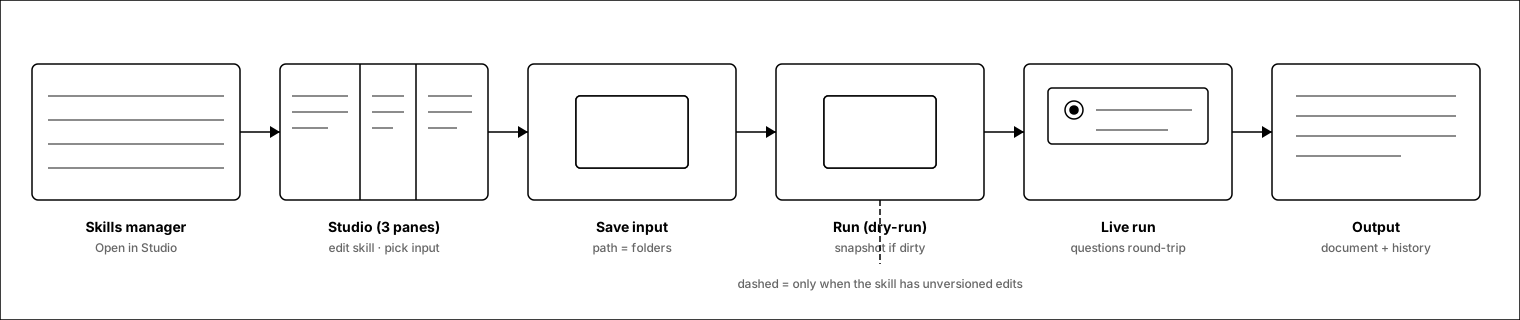
End-to-end: open → edit → save input → run → answer → output
Solid arrows are the happy path. The dashed drop under “Run” only appears when the skill has unversioned edits (screen 7).
1.Skills manager entry
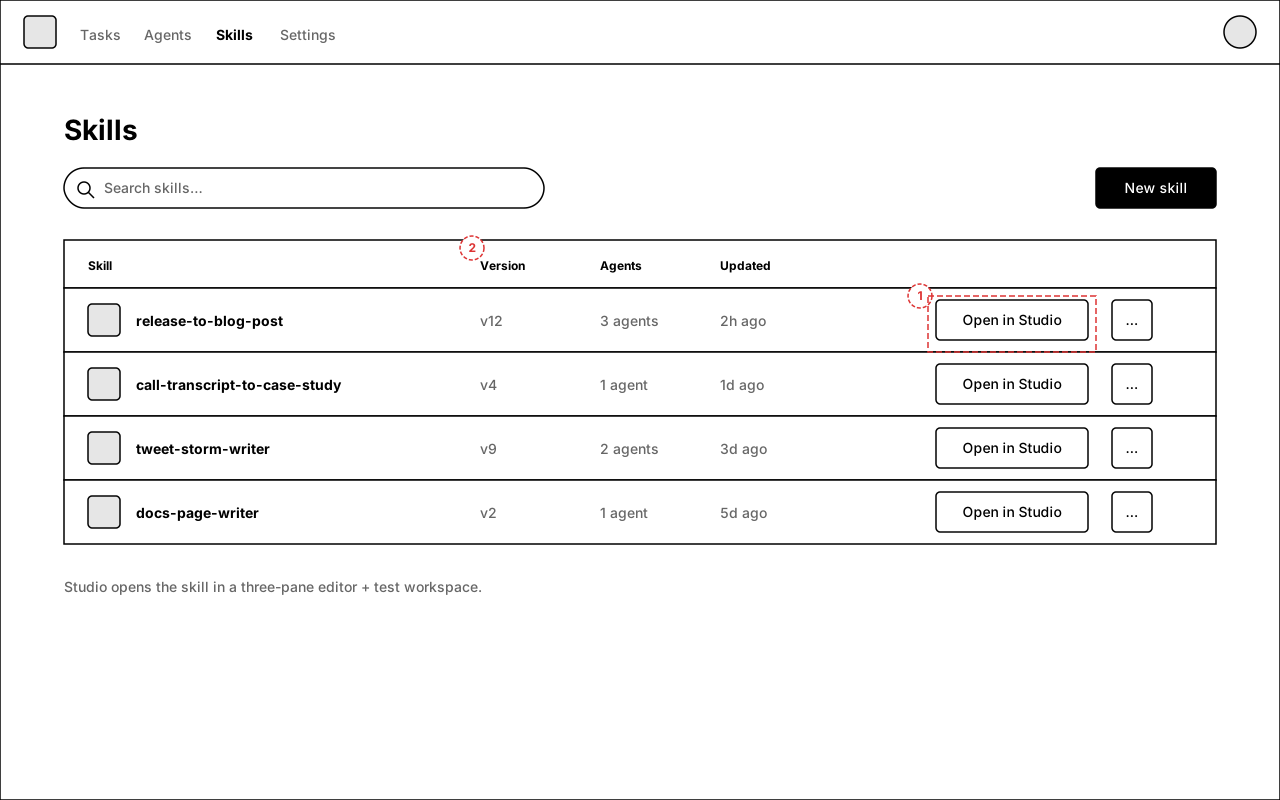
Studio is part of the existing Skills manager, not a separate app. Every skill row gets an “Open in Studio” action next to the overflow menu.
Annotations
- 1 — “Open in Studio” per skill row; the only new affordance on this page.
- 2 — Version column already exists (skills auto-version on save); Studio leans on it.
2.Studio — three panes
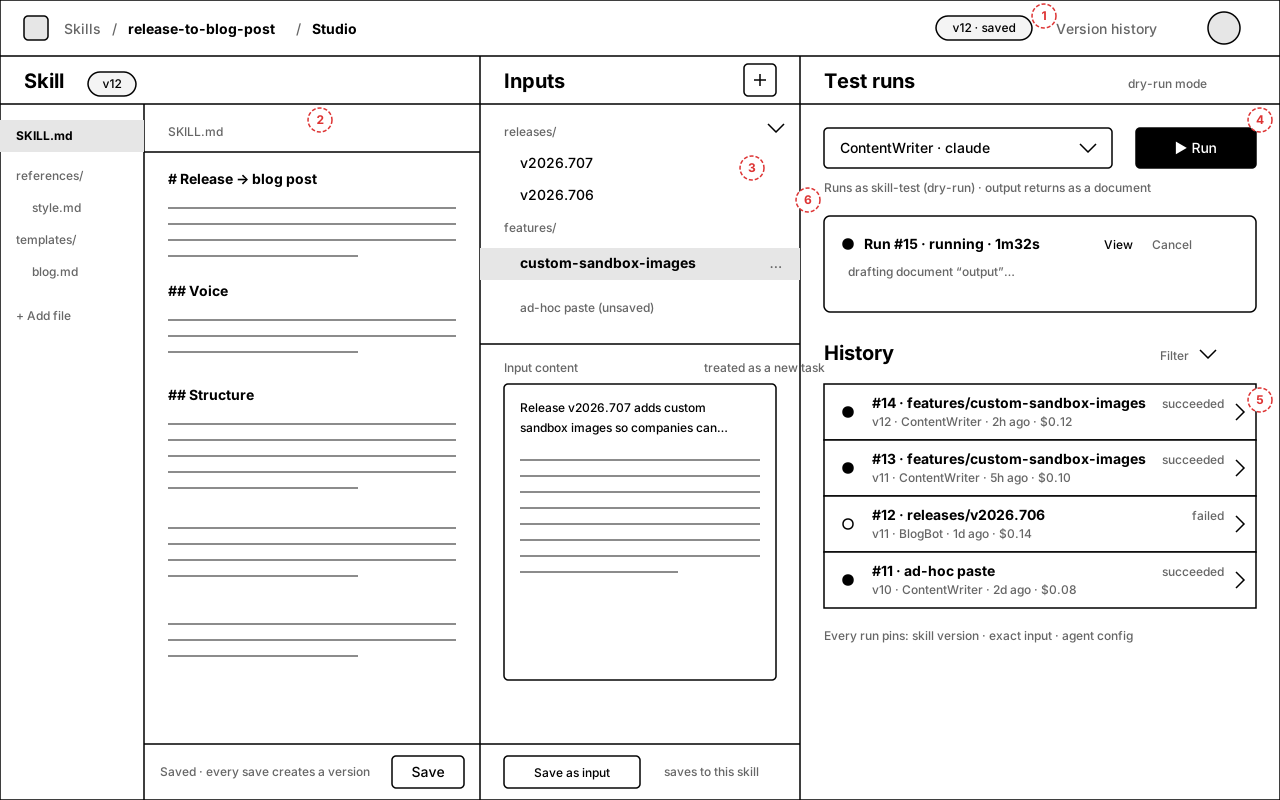
The money screen: skill files + editor (left), saved inputs with path-foldering (middle), agent picker / run / history (right). Panes are resizable and collapsible.
Annotations
- 1 — Skill version chip; every save creates a version, “Version history” opens the existing revision list.
- 2 — File tree + editor is a re-composition of the existing skill-file UI, not a new editor.
- 3 — Inputs are foldered purely by “/” in their name (releases/, features/).
- 4 — Agent picker + Run: pick any company agent; Run is always a dry-run.
- 5 — History rows pin skill rev · input · agent · cost; click for run detail (screen 5).
- 6 — Standing dry-run reminder under the picker.
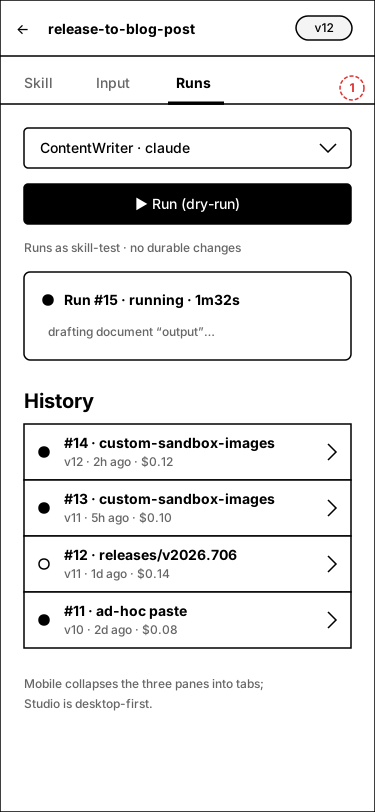
- Mobile: three panes collapse to tabs (Skill / Input / Runs); Studio is desktop-first.
3.Studio — first open
What a user sees the first time they open a skill in Studio: no saved inputs, no runs, and a plain-language explanation of what Run actually does.
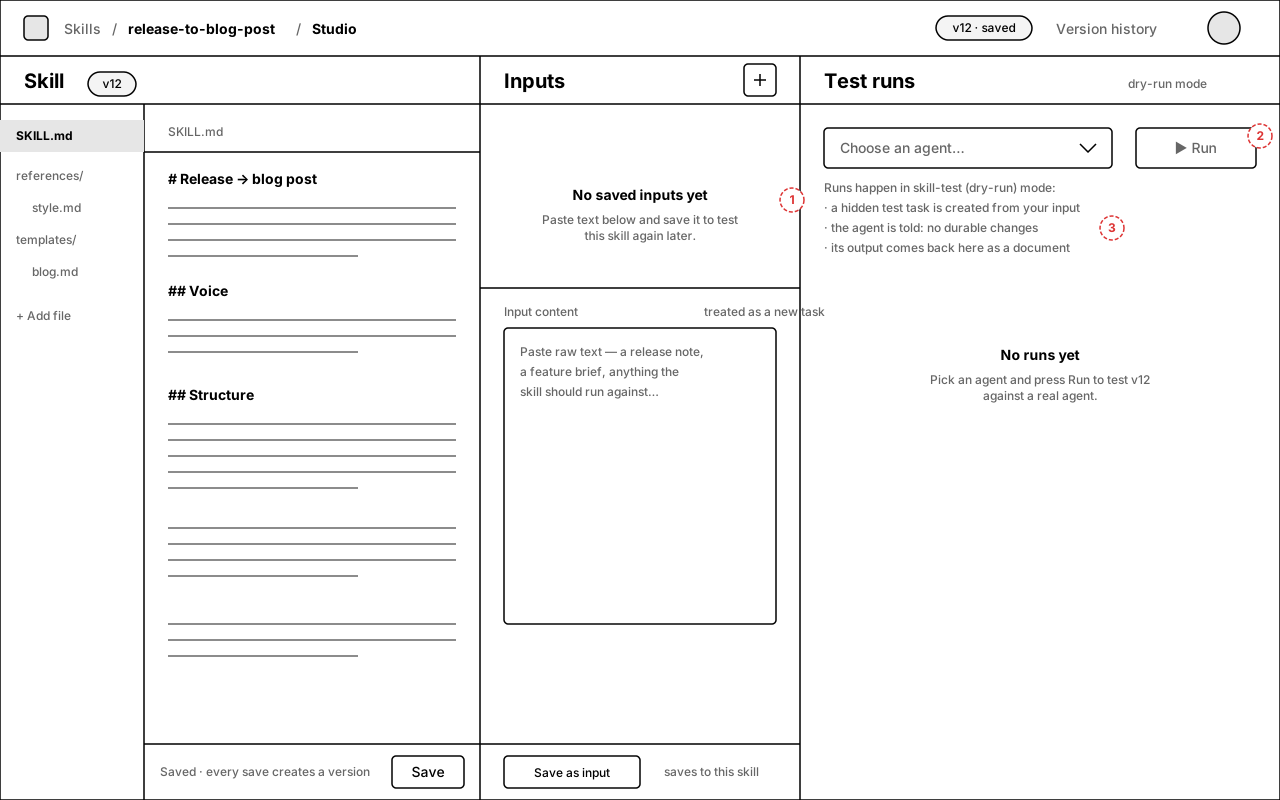
Annotations
- 1 — Middle pane teaches the V1 input model: paste raw text, treated as a new task description.
- 2 — Run stays disabled until an agent is chosen.
- 3 — The three-line explainer is the honest contract: hidden test task, dry-run directive, output returns as a document.
4.Live run + agent question
A run in flight. The middle pane is collapsed to a rail; the runs pane takes the space. The agent under test raised ask_user_questions — the card renders inline and the tester answers without leaving Studio.
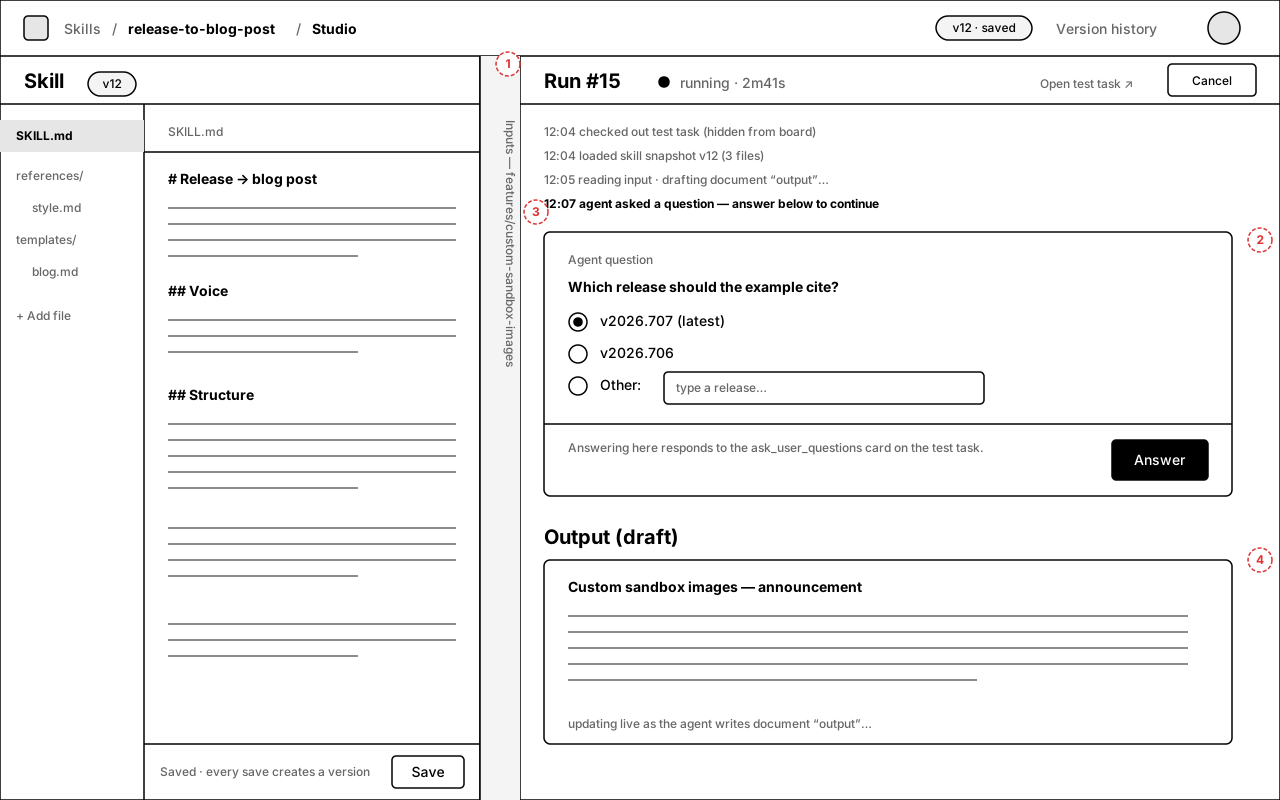
Annotations
- 1 — Collapsed input rail: panes are resizable/collapsible (react-resizable-panels).
- 2 — Question card is the real issue-thread interaction from the hidden test task, re-rendered here; answering responds to it.
- 3 — Status timeline streams from the run (checkout, skill snapshot load, document writes).
- 4 — Draft output preview updates as the agent writes document “output”.
5.Run detail — output document
A finished run. The header pins the exact snapshots; the body renders the output document — including artifacts the agent attached — exactly as it exists on the test task.
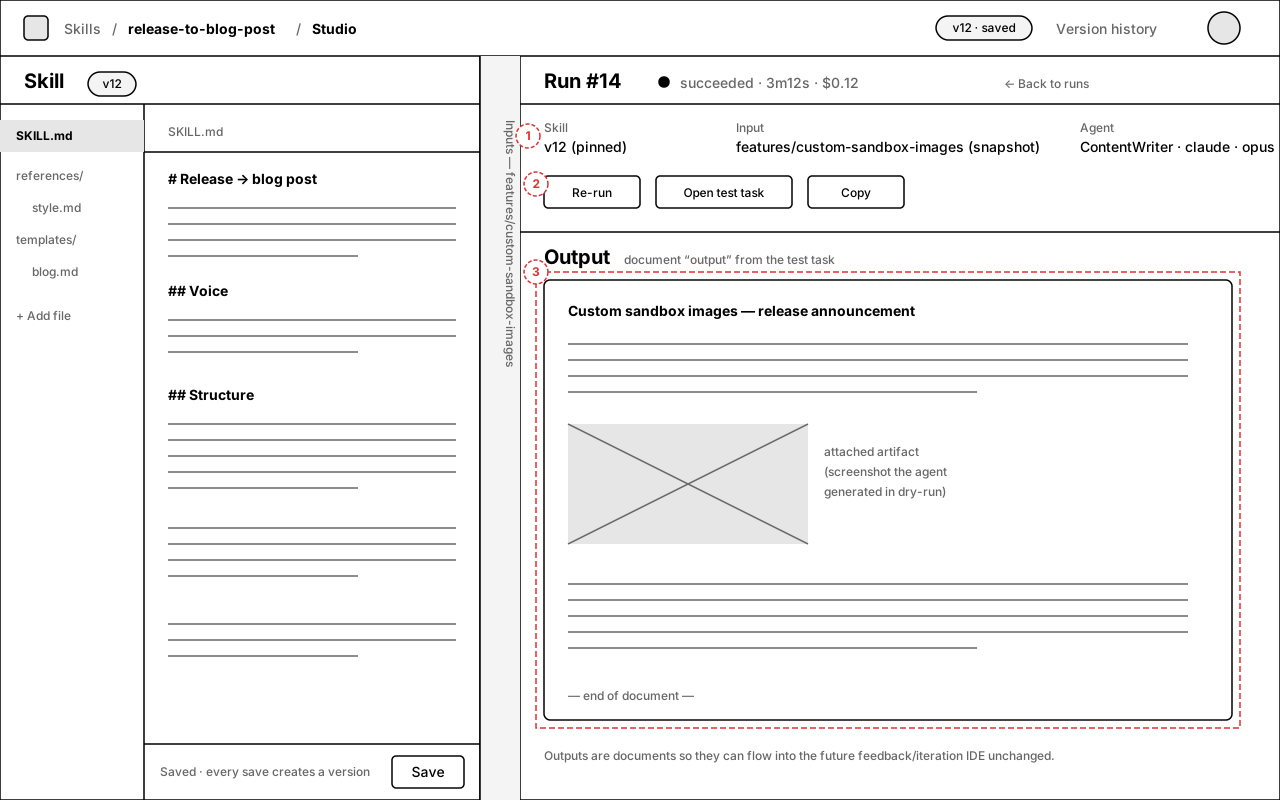
Annotations
- 1 — Snapshot bar: skill v12 (pinned) · input snapshot · agent config. History stays valid even if the skill, input, or agent changes later.
- 2 — Re-run repeats with identical snapshots; “Open test task” jumps to the hidden task for full trace.
- 3 — The output is a document (dashed = future hook): it can flow into the planned feedback/iteration IDE unchanged.
6.Save input — foldering by path
Saving the middle pane's pasted text as a reusable input. Folders are just “/” segments in the name — no separate folder management UI in V1.
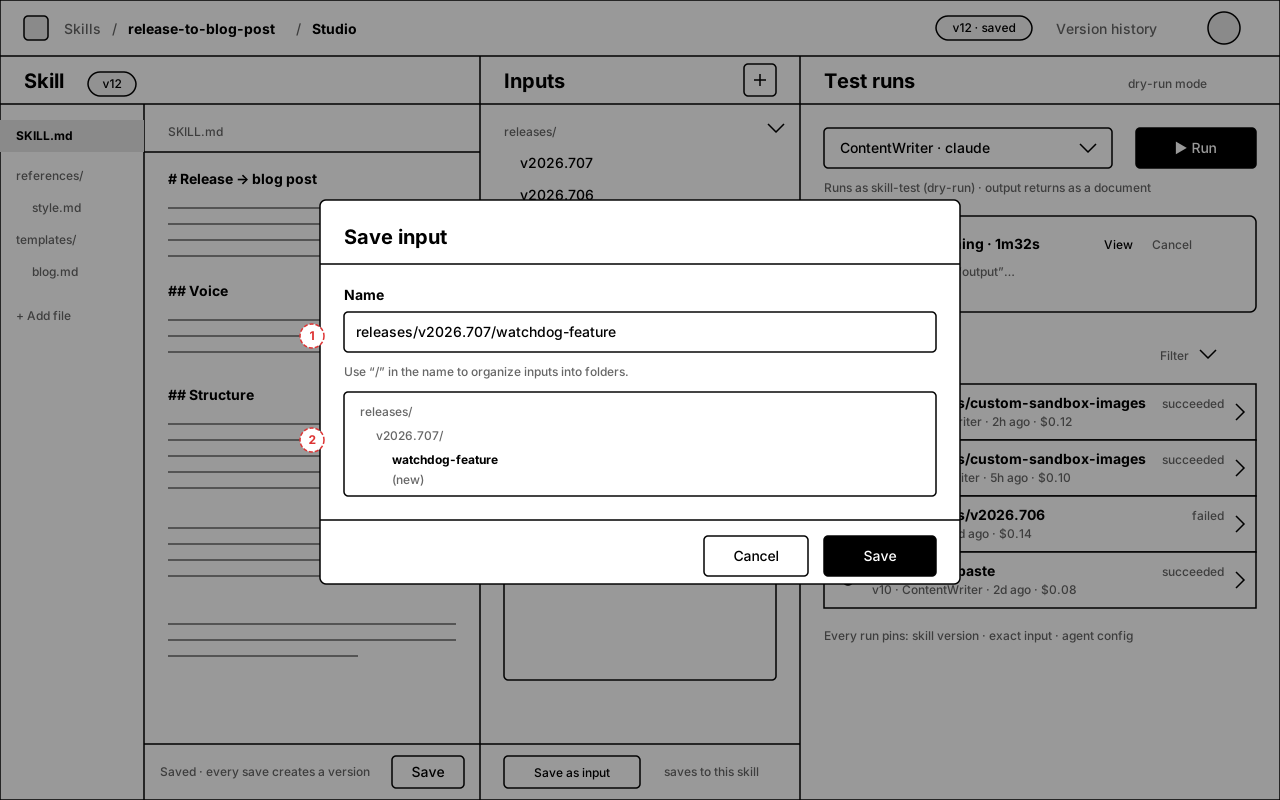
Annotations
- 1 — Name field accepts paths; the hint is the whole feature.
- 2 — Live preview shows where the input lands in the middle-pane tree.
7.Run with unversioned edits
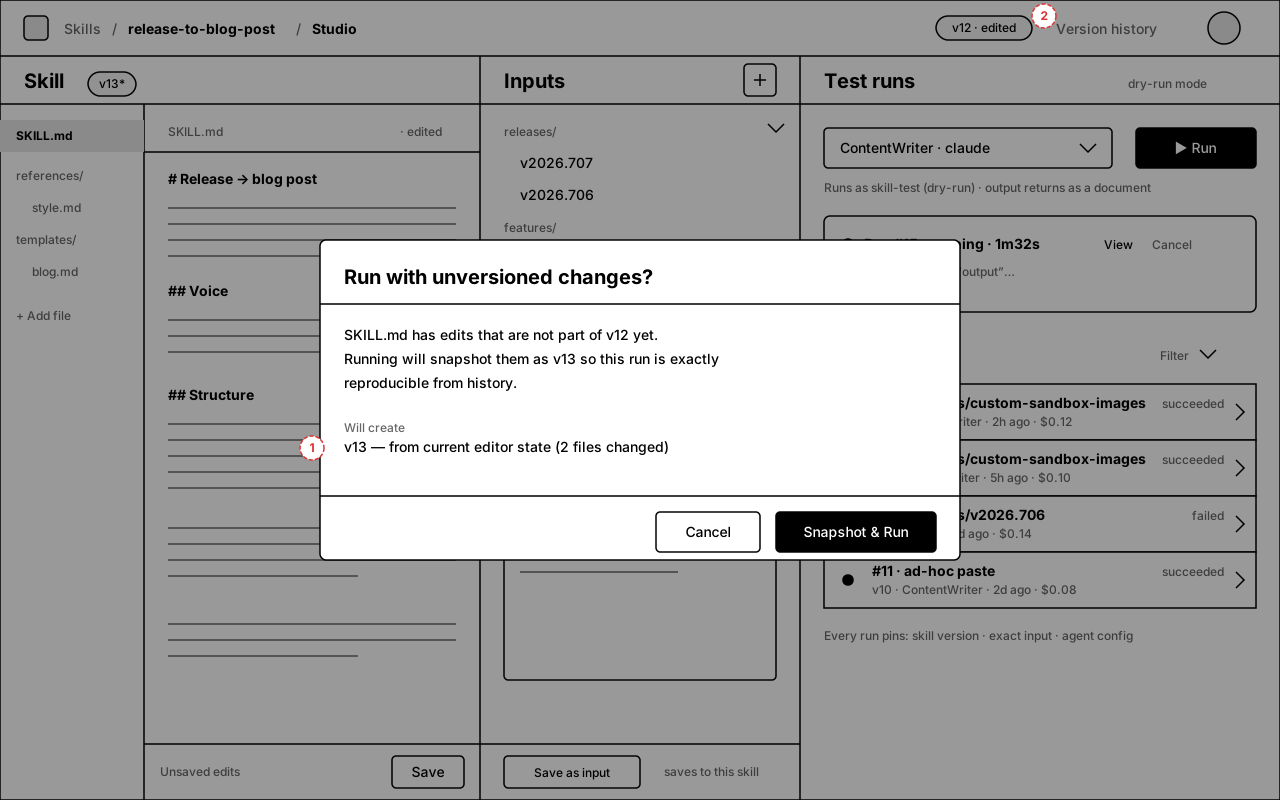
Pressing Run while the editor has unsaved/unversioned changes. Studio snapshots them as the next version first, so every run in history points at a real, reproducible skill revision.
Annotations
- 1 — The dialog names exactly what will be created (v13, from editor state).
- 2 — Header chip flips to “v12 · edited” / “v13*” when dirty, so the state is visible before you run.
8.Agent picker — open state
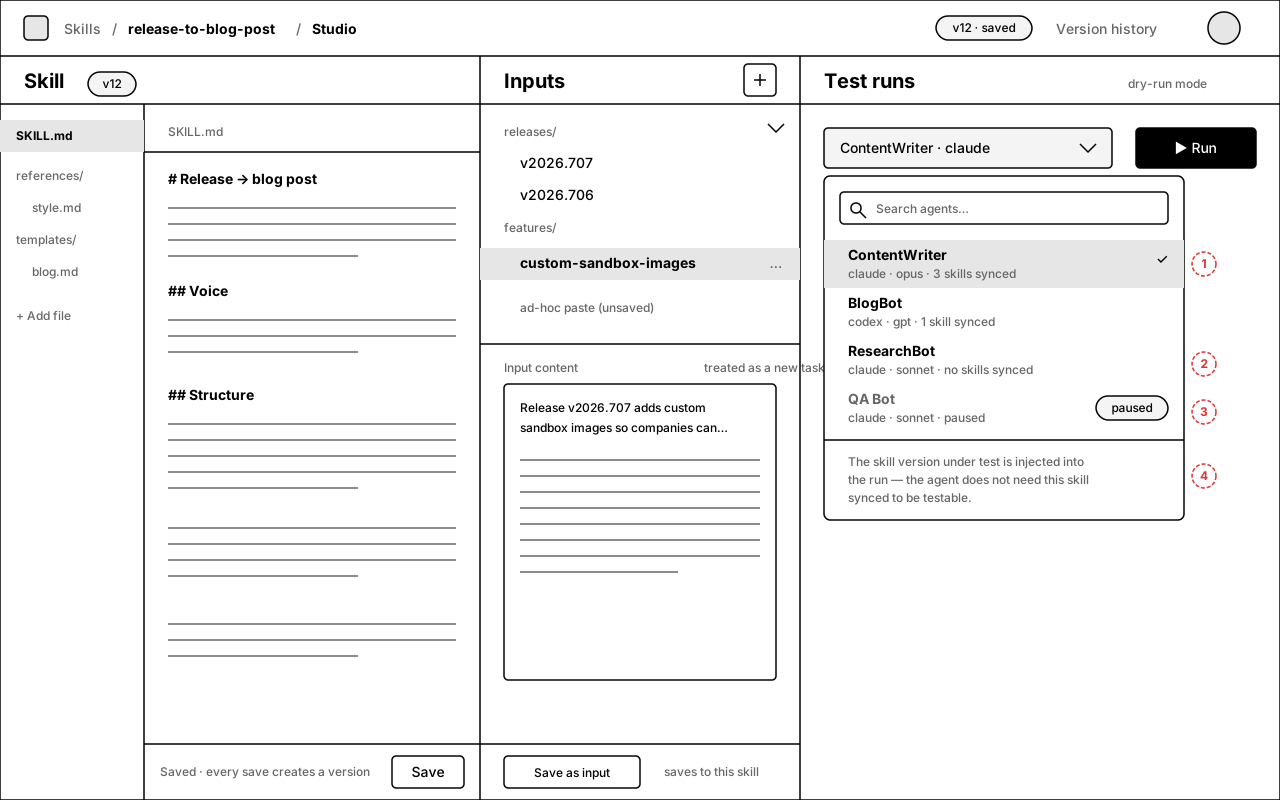
The picker lists every company agent. Because the skill version under test is injected into the run context, an agent does not need the skill synced to be picked — that's the core testing loop, not an edge case.
Annotations
- 1 — Row = agent name (14/600) + meta line “adapter · model · N skills synced”. Checkmark = current selection. Type-ahead search above.
- 2 — Agents with the skill not synced are fully pickable — no warning state. The meta line is informational only.
- 3 — Paused agents render muted with a “paused” chip and are not selectable (a paused agent can't take a wake).
- 4 — Standing footer inside the dropdown states the injection rule so testers never wonder “does this agent have my skill?”.
9.Version history + diff
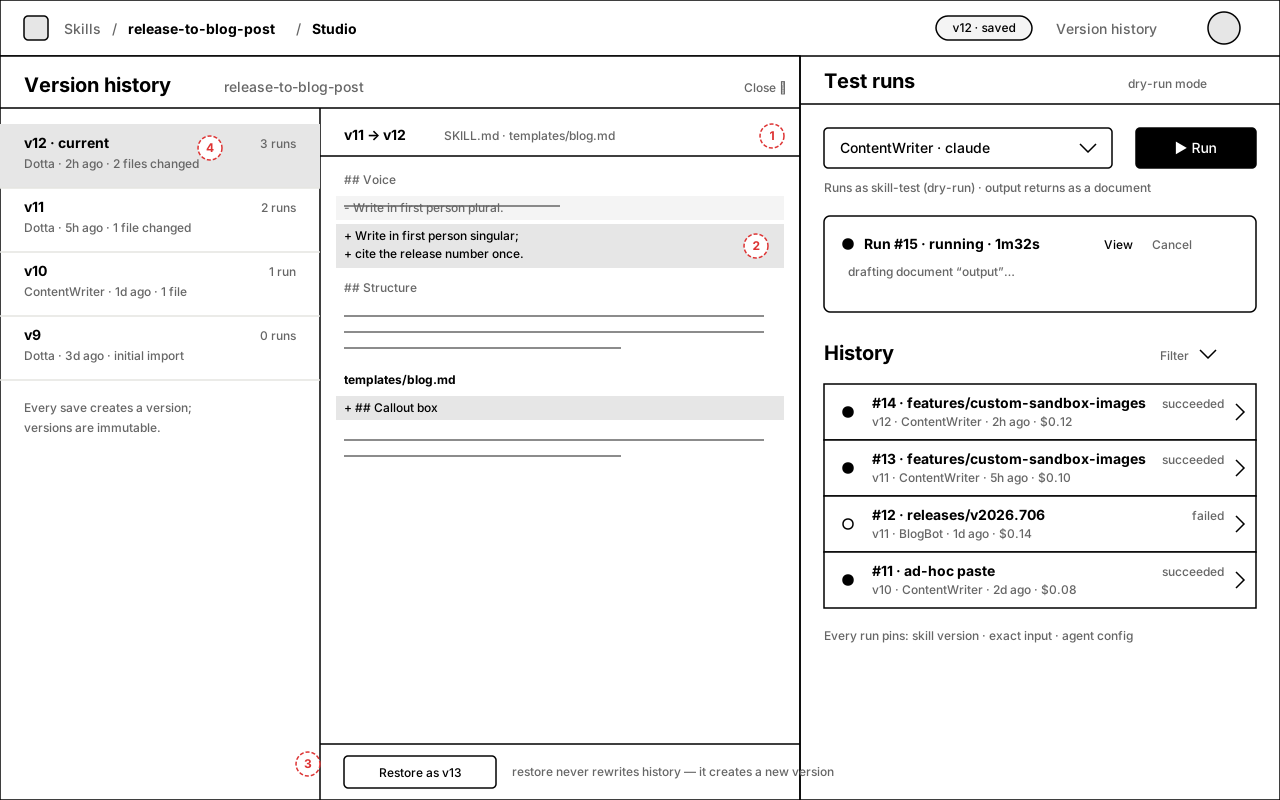
“Version history” in the top bar opens a drawer over the left+middle panes: version list on the left (author, age, files changed, run count), line diff on the right. The runs pane stays put so you can cross-reference history rows.
Annotations
- 1 — Diff header names the version pair and the changed files; body is the existing line-diff viewer (same one the skills manager uses), grouped per file.
- 2 — Added lines on the dark tint with “+”, removed lines struck through on the light tint with “−”. No new diff engine.
- 3 — “Restore as v13”: restore never rewrites history — it snapshots the selected version's files as a new head version. Versions are immutable.
- 4 — Per-version run count comes from test-run rows pinned to that version; clicking it filters run history to that version.
10.Failed run
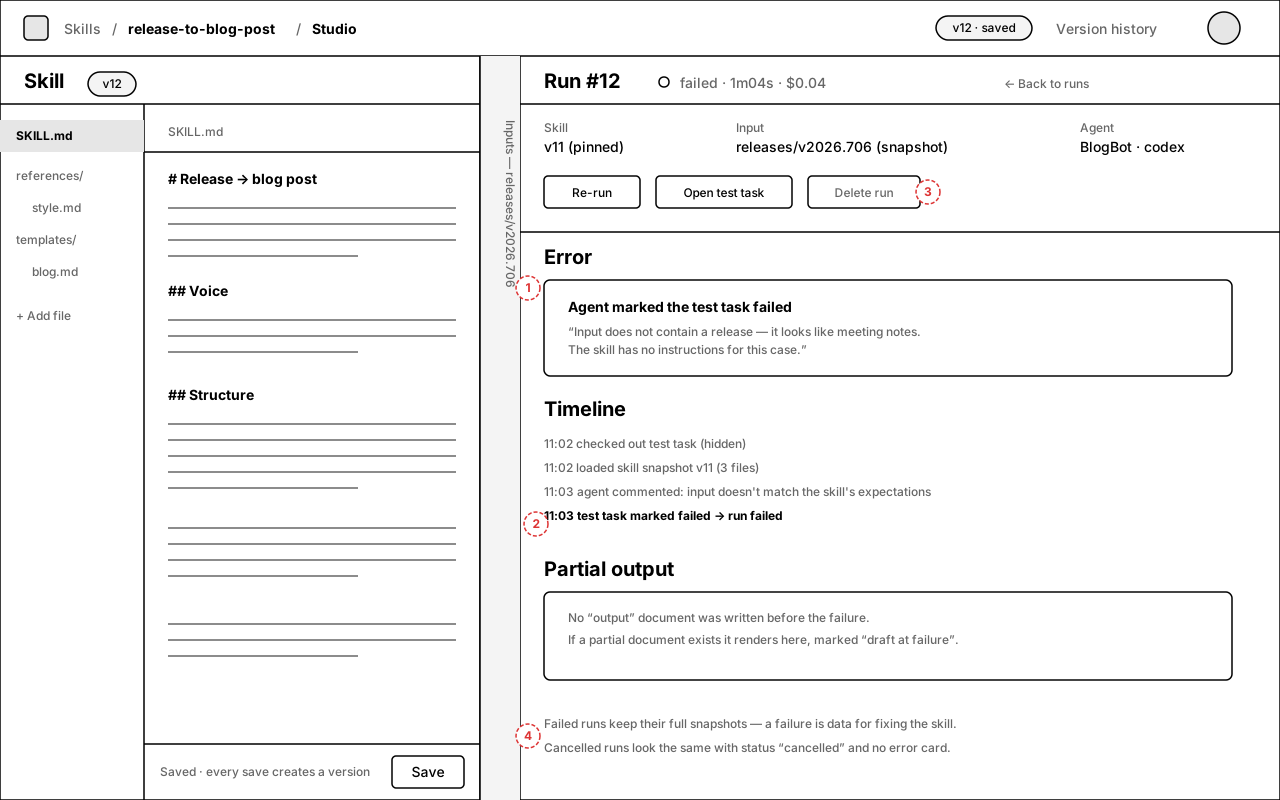
Failures are first-class: same layout as a successful run detail (screen 5), with an error card and the run timeline instead of a rendered output. A failure is data for fixing the skill, so nothing is discarded.
Annotations
- 1 — Error card: headline = how the run failed (agent marked task failed / adapter error / cancelled by budget), body = the agent's own words from the test task.
- 2 — Timeline is the run's status/comment trail from the hidden task, so the tester sees why without leaving Studio.
- 3 — “Delete run” exists only on terminal runs; it deletes the run row + hidden task. “Re-run” reuses the exact pinned snapshots.
- 4 — Cancelled runs use this identical layout with status “cancelled” and no error card. Partial “output” documents render marked “draft at failure”.
11.Input management + per-input history
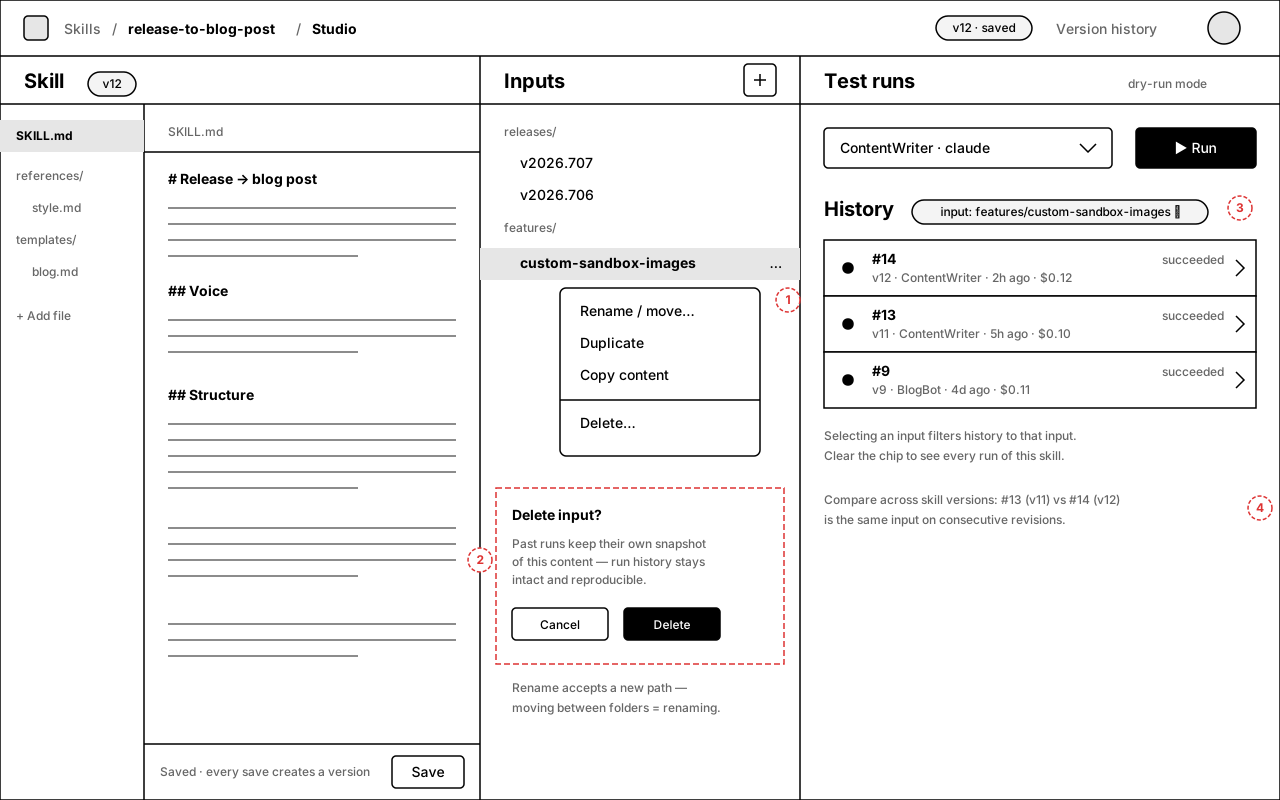
Every input row has an overflow menu (rename/move, duplicate, copy, delete). Selecting an input also filters run history to that input — that's how “inputs you've run before also have history” shows up in the UI.
Annotations
- 1 — Overflow menu per input row. “Rename / move…” accepts a new path — moving between folders is renaming, because folders are just “/” segments.
- 2 — Delete confirm (dashed = state after “Delete…”): copy explicitly promises that past runs keep their own content snapshot, so deleting an input never breaks history.
- 3 — Selecting an input applies a dismissible filter chip on History. Clearing the chip shows all runs for the skill.
- 4 — The filtered view is the poor-man's eval: the same input across consecutive skill versions (#13 on v11 vs #14 on v12) reads top-to-bottom.
12.Interactions — inline vs fallback
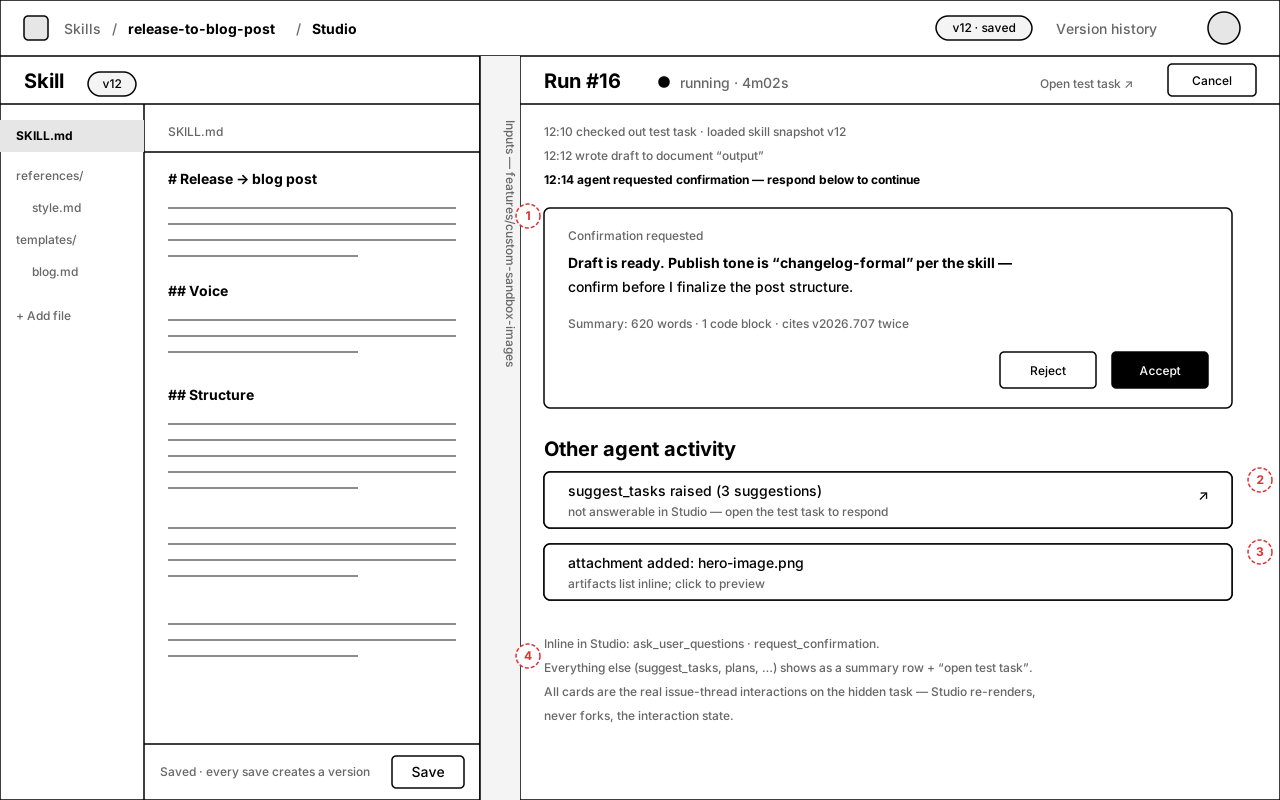
The agent under test can do anything an agent can do on a task. Studio renders two interaction kinds inline and answerable (ask_user_questions, request_confirmation); everything else appears as a summary row linking to the hidden test task.
Annotations
- 1 —
request_confirmationrenders inline with Accept/Reject; answering resolves the real interaction on the test task and the run continues. - 2 — Non-inline kinds (e.g.
suggest_tasks) show as a summary row + “open test task ↗” — visible, not silently dropped. - 3 — Attachments/artifacts the agent creates list inline with click-to-preview.
- 4 — Rule of the screen: Studio re-renders the issue-thread interaction state, it never forks it. One source of truth on the hidden task.
Spec for downstream agents
Precise definitions the implementation issues (P0–P5) should treat as the contract. Anything not listed here is implementer's choice within the design system.
Route & deep links
- Studio route:
/:prefix/skills/:skillId/studio. Entry = “Open in Studio” row action in the Skills manager (screen 1). - Deep links:
?input=:inputIdselects an input (and applies the history filter);?run=:runIdopens run detail. Both survive reload. - “Open test task ↗” opens the hidden issue's normal task page in a new tab (visible via direct link only — never via lists/search).
Run status machine
queued → running → succeeded | failed | cancelled. Terminal states are final; “Re-run” always creates a new run from the same snapshots.- Status source of truth: the hidden task. Task
done→ runsucceeded(output doc key recorded); taskfailed→ runfailed; Studio Cancel → runcancelled+ test task closed. - Dot glyphs: filled = succeeded/running, hollow = failed/cancelled (with status word beside it — never color-only).
- While
queued|running: poll run status every 2s (V1); switch to the run-events stream if already available. Stop polling on terminal. - Concurrent runs are allowed (different agents/inputs in parallel); each is its own hidden task. The “current run” card shows the newest non-terminal run.
Interaction rendering matrix
ask_user_questions→ inline card, answerable (screen 4).request_confirmation→ inline card, Accept/Reject (screen 12).- All other interaction kinds → summary row + “open test task ↗” (screen 12). Never silently dropped.
- Agent comments → timeline entries. Documents: key
outputrenders as the output preview/detail; other documents list as rows. Attachments list inline with preview. - Studio re-renders interaction state from the hidden task; answering posts to the existing interaction-response endpoint. No parallel interaction store.
Buttons & disabled logic
- Run disabled when: no agent selected, or effective input content is empty, or the skill has no files. Tooltip states which condition failed.
- Run with unversioned edits → snapshot dialog (screen 7). Confirming creates the version, then the run.
- Save as input disabled when content is empty. Saving an already-saved input updates it in place (inputs are mutable; runs snapshot content at run time, so no input versioning).
- Cancel visible on
queued|runningonly. Delete run on terminal runs only. - Paused agents unselectable in the picker (screen 8).
Panes
- Default split 37.5 / 25 / 37.5; min widths 280 / 240 / 360 px; middle pane collapses to a 40px vertical rail showing the selected input name (screens 4/5/10/12).
- Pane sizes + collapse state persist per user (localStorage key
skillStudio.paneSizes). - Below ~900px the panes become tabs (Skill / Input / Runs — mobile variant on screen 2). Desktop-first; mobile is read-and-answer, not editing-optimized.
Inputs
- Name is a free-text path; “/” segments render as folder groups, sorted alphabetically, files after folders. No separate folder entity, no empty folders.
- Rename/move = PATCH of the name. Duplicate = copy with “ (copy)” suffix. Delete = soft delete; run history keeps its own
input_snapshot. - “Ad-hoc paste (unsaved)” is a pseudo-row: running from it stores the content only on the run row (
input_id null); history labels it “ad-hoc paste”.
Cost & permissions
- Every history row shows run cost from existing run accounting; test runs count against normal budgets — no separate metering in V1.
- View Studio: anyone who can view skills. Edit skill files: same permission as today's skills manager. Start/cancel test runs: members who can create issues (a test run is a real agent run that costs money).
Empty / edge states
- First open: screen 3 (no inputs, no runs, explainer under the picker).
- Skill with zero files: left pane shows “+ Add file” empty state; Run disabled.
- Deleted agent in old history rows: name renders from
agent_config_snapshotwith a “(removed)” suffix; Re-run requires picking a live agent. - Hidden test task deleted by retention: run row remains, “Open test task” disabled with a “task expired (retention)” tooltip; snapshots + output copy stay on the run row, so the output document body must be copied onto the run record at completion time.
Open questions
- Name — “Skill Studio” is used throughout; Workshop / Lab still on the table (plan §0).
- Run pane density — current run card + history in one column (screen 2) vs. a dedicated “runs” tab; wireframes assume one column for V1.
- Interaction scope — now defined on screen 12: questions + confirmations inline, everything else via summary row + “open test task”. Flag if you want more kinds inline in V1.
- Dirty-run dialog — confirm each time (screen 7) or a one-time setting with silent auto-snapshot afterwards? Wireframes assume confirm-each-time.
- Mobile — tabs variant (screen 2) is a fallback, not a goal. OK to ship desktop-only and let mobile read runs/history?